It is not possible to migrate the Centrifuge(OLD) tokens to Ethereum, because despite the fact that it is possible to connect the Talisman wallet, the Ethereum address stack is not active
1 Like
Good day @Dmitrys
The forum is the place for Governance Discussion.
If you have any issues, please open a ticket in Discord, where you will receive assistance.
However, I just checked and the migration app is working perfectly.
Let’s try to follow the next steps:
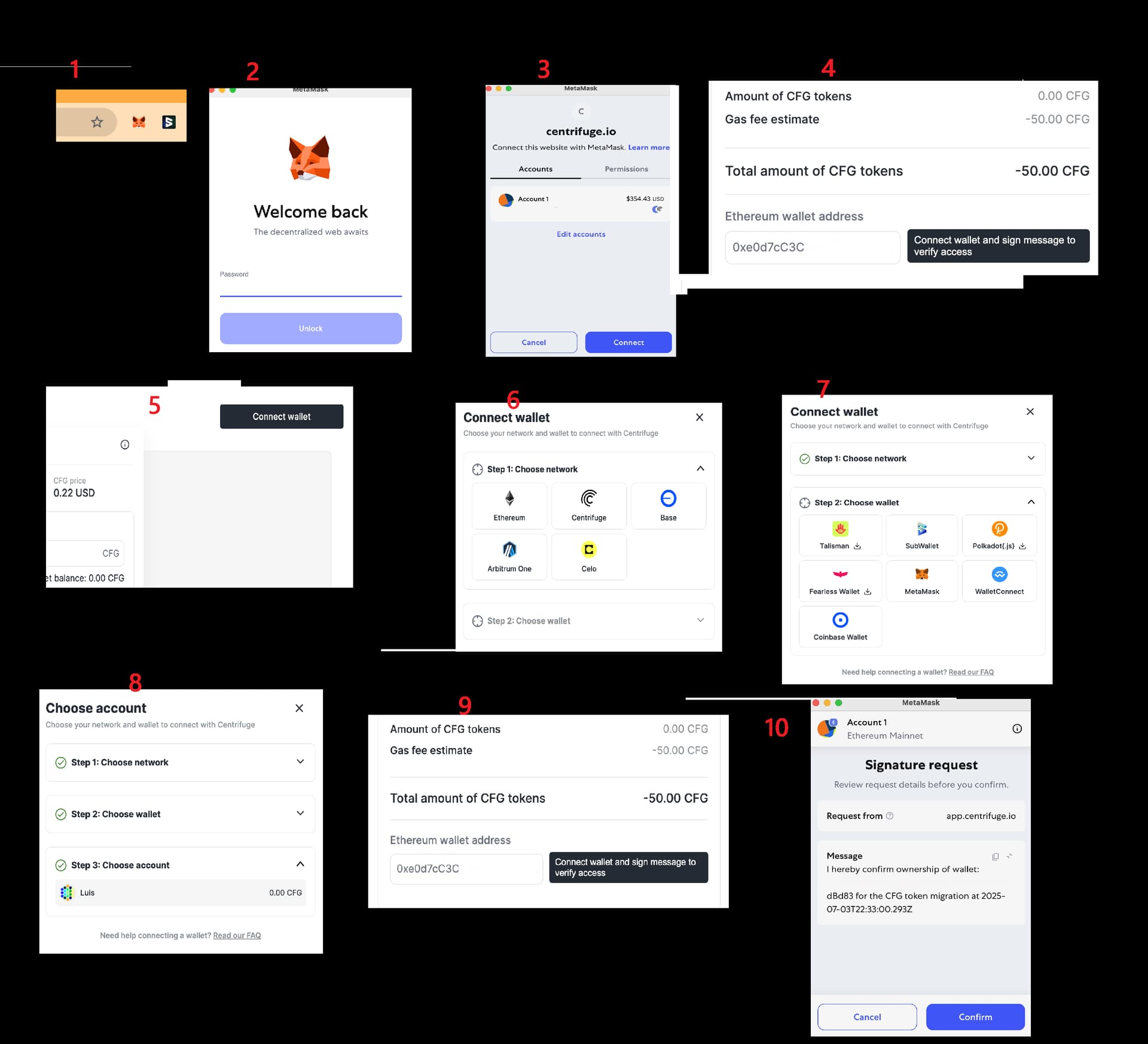
- Please make sure Polkadot.js and Metamask are the only two wallets enabled on the explorer and give permission to connect to the Centrifuge Migration Portal.
- When you open the Centrifuge migration portal, Metamask will ask for your password and permission to connect to the site. Please allow it.
- Now you should be able to see your ETH address in the TextBox
- Connect to Subwallet, click on the “Connect wallet” button at the top right.
- Choose Centrifuge Network.
- You can choose SubWallet\Talisman.
- Choose your account.
8 .Click on “Connect wallet and sign message to verify access” next to the Ethereum wallet address textbox. - Confirm Signature request.
- Finally, click on the Migrate button.
1 Like